Join Dr Cynthia Orozco this afternoon at 4pm for a history lesson on Ranching in Lincoln County. This is part of an 8-piece series of programs throughout the county this Fall.
Ruidoso Public Library will be closed Thursday, Friday, and Saturday for Thanksgiving, November 28-30. We will re-open Monday, December 2, at 9 am.
Remember Butterball has answers for any food emergencies Thursday. Visit http://www.butterball.com/media/turkey-talk-line. Or call 1-800-Butterball (800-288-8372). You may also need to visit Reader's Digest's collection of turkey bloopers to gain a sense of perspective, too.
Better yet, pre-plan your feast with these tips (what to buy, how to thaw, how to brine, etc).
My dad was a volunteer firefighter for 25 years; please help firefighters spend their holidays at home with family by watching this William Shatner narrated video by State Farm or reading these tips on how to deep fry your turkey. If the video does not load, the link is http://www.youtube.com/watch?v=ETBD0EqQGoU. The Tips are:
Safe Turkey Frying Tips
1: Avoid oil spillover--don't overfill the pot.
2: Turn off flame when lowering the turkey into oil.
3: Fry outside, away from the house.
4: Properly thaw the turkey before frying.
5: Keep a grease-fire-approved extinguisher nearby. (Here's an explanation of a class K extinguisher.)
You will also need to know how to use the extinguisher: read pages 3 and 6 here: http://emilms.fema.gov/IS909/assets/09_PuttingOutFires.pdf
Showing posts with label links. Show all posts
Showing posts with label links. Show all posts
Monday, November 25, 2013
Monday, October 14, 2013
Map your favorite book!
 |
| Image from Lucius Beebe Memorial Library on flickr |
Have you read a book and wondered what the location really looked like? In my case, I did not read Tony Hillerman's Jim Chee mysteries until after I had lived south of Gallup and Grants for several months and moved away from the state for a couple of years. Yet I found having the personal knowledge of the towns, distances, and local quirks contributed depth to my appreciation of the novels.
In my mother's case, when she read Michael Connelly's Harry Bosch books, she wondered how many places were based on a real place. As luck would have it, another fan of the books shared that thought and made a Google map to answer.
If connecting a story to real places catches your fancy, you might also be interested in the Placing Literature project here: http://placingliterature.wordpress.com/page/2/ . This project focuses on books set in Duluth, New Haven, and San Francisco (see their site for the reading list).
If you are interested in following walks through well-known towns and titles, Ruidoso Public Library has three: one for Santa Fe, another for Dickensian London, and one on Hemingway's Paris.
Armchair travel connects exotic locales and literature without leaving the comfort of home (or the public computers at the library!). I found a Google map of St. Petersburg, Russia, including photos of locations from Dostoyevsky's Crime and Punishment (available online to read or listen to). Comment below, email the library, or call us if you would like to find a map connecting a specific author, book, or city through literature.
Monday, March 4, 2013
Also in Universal Class:Education (GED or Home schooling)
Remember Daylight Savings Time begins next Sunday, March 10. The clocks "spring" forward one hour.


Images from Universal Class
While the name Universal Class tries to express itself fully, today's blogpost digs into the school-age focused options, simply to clarify. Some of the courses are designed to involve both parents and children or teachers and students, rather than ask kids to enroll and work online directly. Some courses are targeted at older students or non-traditional students approaching the GED from many different levels of experience.
You are welcome to try any class; age is no object. Whether your interest or need is for science, mathematics, grammar, history, or another language, I hope you find something useful. This is not the complete list, by far; peruse other options here.
ABCs of Algebra
Algebra 101
Basic Math 101
ABCs of Geometry
ABCs of English Grammar
English Composition
Basic Research Skills
Essay Writing 101
ABCs of Physics
Biology 101
Astronomy 101
Chemistry 101
Geography 101
American Civil War 101
American Revolutionary War 101
American Government
American History Review
Ancient Civilizations 101
Economics 101
Economics 201
Computer Basics 101
ESL Basic Grammar
ESL Basic Writing Skills
First Grade Curriculum 101
Second Grade Curriculum 101
Third Grade Curriculum 101
GED Test Preparation
Images from Universal Class
While the name Universal Class tries to express itself fully, today's blogpost digs into the school-age focused options, simply to clarify. Some of the courses are designed to involve both parents and children or teachers and students, rather than ask kids to enroll and work online directly. Some courses are targeted at older students or non-traditional students approaching the GED from many different levels of experience.
You are welcome to try any class; age is no object. Whether your interest or need is for science, mathematics, grammar, history, or another language, I hope you find something useful. This is not the complete list, by far; peruse other options here.
ABCs of Algebra
Algebra 101
Basic Math 101
ABCs of Geometry
ABCs of English Grammar
English Composition
Basic Research Skills
Essay Writing 101
ABCs of Physics
Biology 101
Astronomy 101
Chemistry 101
Geography 101
American Civil War 101
American Revolutionary War 101
American Government
American History Review
Ancient Civilizations 101
Economics 101
Economics 201
Computer Basics 101
ESL Basic Grammar
ESL Basic Writing Skills
First Grade Curriculum 101
Second Grade Curriculum 101
Third Grade Curriculum 101
GED Test Preparation
Monday, February 18, 2013
Did you know this blog is mobile?
I didn't. Until I was poking around in the settings.
Voila! Here's the QR code to scan with your tablet or smart phone, if you'd like to catch up with these fun notes while waiting in line or just killing time.
The first step is to open this blog on your smartphone or tablet: http://ruidosopubliclibrary.blogspot.com/ Or, if you have already bookmarked the library's homepage on your device, select the "Library News" tab. Your device will automatically know to ask for the mobile version.
What's the point? I find I do less work on my mobile device, but love to read, especially blogs and Facebook. Sadly, I am too lazy to type (reply or interact) on my mobile, when I am far more interactive on a laptop or desktop. I have big hands; maybe I should explore more voice controls?
What does the blog look like on mobile?
What is your experience with mobile technology? Do you see it around you yet? Are you up to three or more mobile devices? What could the library do to help you? (These questions might also show up in the little quiz widget at the bottom of the right-hand column in the desktop view.)
-introductory training sessions?
---ebooks on your smartphone?
---just how to use it at all?
-text message (SMS on cell phone) reminders when books are due?
I cannot guarantee we can host classes on every smartphone, but there are many similarities. And I am not sure about the text message notifications, since we have so many visitors and different phone systems. *But* if we hear a lot of interest for it, then I will have a reason to look into it. If you are interested in a class on how-to use your smart phone or tablet, please tell me (comment below or email) the type of phone you have (Apple, Android) or if you prefer tablet (and which brand).
P.S.: The Children's Department is looking for small plastic lids. They hope to include home-made car crafts this summer and need tires. Ideally the sturdy, similarly sized milk jug and juice lids, but not the flimsier, larger lids on butter tubs or mayonnaise jars.
Voila! Here's the QR code to scan with your tablet or smart phone, if you'd like to catch up with these fun notes while waiting in line or just killing time.
The first step is to open this blog on your smartphone or tablet: http://ruidosopubliclibrary.blogspot.com/ Or, if you have already bookmarked the library's homepage on your device, select the "Library News" tab. Your device will automatically know to ask for the mobile version.
What's the point? I find I do less work on my mobile device, but love to read, especially blogs and Facebook. Sadly, I am too lazy to type (reply or interact) on my mobile, when I am far more interactive on a laptop or desktop. I have big hands; maybe I should explore more voice controls?
What does the blog look like on mobile?
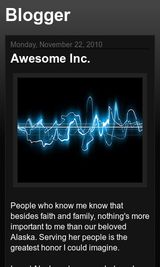 |
| mobile version of blog |
What is your experience with mobile technology? Do you see it around you yet? Are you up to three or more mobile devices? What could the library do to help you? (These questions might also show up in the little quiz widget at the bottom of the right-hand column in the desktop view.)
-introductory training sessions?
---ebooks on your smartphone?
---just how to use it at all?
-text message (SMS on cell phone) reminders when books are due?
I cannot guarantee we can host classes on every smartphone, but there are many similarities. And I am not sure about the text message notifications, since we have so many visitors and different phone systems. *But* if we hear a lot of interest for it, then I will have a reason to look into it. If you are interested in a class on how-to use your smart phone or tablet, please tell me (comment below or email) the type of phone you have (Apple, Android) or if you prefer tablet (and which brand).
P.S.: The Children's Department is looking for small plastic lids. They hope to include home-made car crafts this summer and need tires. Ideally the sturdy, similarly sized milk jug and juice lids, but not the flimsier, larger lids on butter tubs or mayonnaise jars.
Monday, February 11, 2013
More in Universal Class: Health
Maybe you visited the Village's health fair last month? The library had a table loaded with flyers and posters and bookmarks on the different ways the library can help you understand and explore health issues. If you didn't, this blogpost is an excellent alternative because much of the same material is below. As a library, we are not health experts and cannot advise. We can connect you with the county health office [575-258-3252], the state's nursing hotline [ 1(877) 725-2552], or other reliable sources of information. As with legal questions, please visit us at the library and let us know if you would like a little more privacy (such as the Archive Room) to ask your questions, or reach out to us through email.
Outside of the articles, nursing specific, and direct-from-the-government's National Institute of Health tutorials, videos, FAQs, and guides, the library provides you access to classes to explore health topics, too. As mentioned in earlier posts, these classes are free to you, start whenever you are ready, and go as fast or slow as you need. There may be videos to watch or text to read online (or print and keep for later reference). The instructor may suggest other sites for further exploration and assignments to help you apply the new knowledge.
This is a list of the more health-focused courses among the 500 available. Each is a link to open the course (you will need your library barcode number and your email to create an account in order to start).
Reiki 1st and 2nd Degree
Outside of the articles, nursing specific, and direct-from-the-government's National Institute of Health tutorials, videos, FAQs, and guides, the library provides you access to classes to explore health topics, too. As mentioned in earlier posts, these classes are free to you, start whenever you are ready, and go as fast or slow as you need. There may be videos to watch or text to read online (or print and keep for later reference). The instructor may suggest other sites for further exploration and assignments to help you apply the new knowledge.
This is a list of the more health-focused courses among the 500 available. Each is a link to open the course (you will need your library barcode number and your email to create an account in order to start).
Monday, January 21, 2013
Do you ask the BIG questions? Plus some timely announcements at the bottom
[Edit note: class links below are now correct and lead to Ruidoso Public Library's subscription so you may take the classes on us.]
If you are interested in exploring questions of a religious or philosophical nature, the library is a great place to start. Beyond the books or DVDs we can loan you, we have several self-paced online courses, free for you to fit into your schedule, 24/7. Whether your preference is New Age or Biblical, experiential or logical, there's at least one course that might interest you.
As with the business courses, there is an entry class on how to take online courses for novices which teaches you about email, adding an attachment, commenting on another's post, etc. You may have several friends to share with and might want to request the conference room at the library to watch, learn, and discuss the materials together. If so, please email, call, or stop in at your convenience; we'd love to hear from you. Sharon and Jennifer have tried some of these online classes, if you want to talk about specific features of the process or material.
Here's the long list of possible topics:

 |
| © Nevit Dilmen [CC-BY-SA-3.0 or GFDL ], via Wikimedia Commons |

 |
| By Charles Dana Gibson [Public domain], via Wikimedia Commons |
![Charles Dana Gibson [Public domain], via Wikimedia Commons](http://commons.wikimedia.org/wiki/File:Eternal-question.gif)
As with the business courses, there is an entry class on how to take online courses for novices which teaches you about email, adding an attachment, commenting on another's post, etc. You may have several friends to share with and might want to request the conference room at the library to watch, learn, and discuss the materials together. If so, please email, call, or stop in at your convenience; we'd love to hear from you. Sharon and Jennifer have tried some of these online classes, if you want to talk about specific features of the process or material.
Here's the long list of possible topics:
P.S. If you heard about the JAVA update that led to a security problem January 12, some updates are available. For directions on how to uninstall older versions of JAVA and where to install the current patch (JAVA 7 update 11)
P.P.S. If you missed the movie, Forks Over Knives, last Tuesday, you can still catch the flick (online at hulu for free or by checking out the DVD at the library) and read some analysis of the science here.
P.P.S. The library is closed today, Monday, January 21. We will open tomorrow at 9 am.
P.P.S. If you missed the movie, Forks Over Knives, last Tuesday, you can still catch the flick (online at hulu for free or by checking out the DVD at the library) and read some analysis of the science here.
P.P.S. The library is closed today, Monday, January 21. We will open tomorrow at 9 am.
Monday, January 14, 2013
Do you run a business? Or think about it?
[Edit note: on January 30, 2013, I edited all the class links in the bottom list to open inside the Ruidoso Public Library's subscription so you can get the free access with your library card number now. My apologies.]
Ruidoso Public Library is full of resources specifically selected for a community like Ruidoso or Lincoln County, where new businesses, small business, home-based or online businesses are the heart of our economy. Whether you are an employee, the manager, or an owner, the library has *Free* classes that you can take at your convenience. The next several posts will explore different sets of courses, including health, homeschooling or GED preparation, New Age/Spiritual/Religious Studies, Writing, Law/Legal, and many different hobbies. Over 500 courses are available, and I won't describe them all, but if something takes your fancy, feel free to stop by the library for assistance, if the links don't work, or to let us know about a subject that is missing.

Before I list courses, I will try to explain how this works. The library subscribes to Universal Class so you may log in with your library card number, for free, anytime, day or night, any day of the week. If you have not done much online, one of the first things to do is learn how to take an online class. These courses have videos to watch and listen to, or just read the text articles/lectures. Each section may take from 15 minutes to an hour, depending on how new the material is for you, and how many of the supplemental links you explore. There are assignments, quizzes, and exams, which are graded. At the end, there is a document you may print or email as proof of the time you spent.

What does this mean for you? As an employee, it might help you feel more confident making phone calls or facing difficult customer situations. As a manager, assigning a course might help you provide employee development or address a specific safety concern. Maybe you are desperate for a pay raise, but need some strong evidence to prove how you are applying yourself in ways to help the company. These courses require the self-discipline to apply yourself, but you can do all the segments at once, or spread out over days and weeks (up to six months). Outside of your time, they are free. And if you don't have the home computer/internet thing yet, you are welcome to use the public stations at the library. This is a slow time of year and we can help you get started on the computers, though you do need an email address to create your Universal Class account. If enough people comment below, or call the library, I can look into a class on creating your first email account, too.

For employees looking to improve their resumé or support a request for an increase in pay:
Interview Skills
Customer Service
Personal Protective Equipment
Work Place Safety
Waiter or Waitress Training
Telephone Skills and Quality Customer Service
For managers' skill sets:
Payroll Fundamentals
Marketing for Small Business
Employment Law Fundamentals
Personal Protective Equipment
Work Place Safety
Worker's Compensation
Understanding Business Administration 101
For business starters/owners:
Small Business Guide
Pet Sitting
Home Business Guide
Daycare
Start a Concierge Service
Of interest to all types:
Sexual Harrassment Compliance
Bookkeeping and Accounting for all
Accounts Payable Management
Accounts Receivable Management
Anger Management
Assertiveness Training
Confidence Building
Negotiation Skills
Dealing with Difficult People
Retail Business 101
Creating an Effective Sales Team
Ruidoso Public Library is full of resources specifically selected for a community like Ruidoso or Lincoln County, where new businesses, small business, home-based or online businesses are the heart of our economy. Whether you are an employee, the manager, or an owner, the library has *Free* classes that you can take at your convenience. The next several posts will explore different sets of courses, including health, homeschooling or GED preparation, New Age/Spiritual/Religious Studies, Writing, Law/Legal, and many different hobbies. Over 500 courses are available, and I won't describe them all, but if something takes your fancy, feel free to stop by the library for assistance, if the links don't work, or to let us know about a subject that is missing.

Before I list courses, I will try to explain how this works. The library subscribes to Universal Class so you may log in with your library card number, for free, anytime, day or night, any day of the week. If you have not done much online, one of the first things to do is learn how to take an online class. These courses have videos to watch and listen to, or just read the text articles/lectures. Each section may take from 15 minutes to an hour, depending on how new the material is for you, and how many of the supplemental links you explore. There are assignments, quizzes, and exams, which are graded. At the end, there is a document you may print or email as proof of the time you spent.

For employees looking to improve their resumé or support a request for an increase in pay:
Interview Skills
Customer Service
Personal Protective Equipment
Work Place Safety
Waiter or Waitress Training
Telephone Skills and Quality Customer Service
For managers' skill sets:
Payroll Fundamentals
Marketing for Small Business
Employment Law Fundamentals
Personal Protective Equipment
Work Place Safety
Worker's Compensation
Understanding Business Administration 101
For business starters/owners:
Small Business Guide
Pet Sitting
Home Business Guide
Daycare
Start a Concierge Service
Of interest to all types:
Sexual Harrassment Compliance
Bookkeeping and Accounting for all
Accounts Payable Management
Accounts Receivable Management
Anger Management
Assertiveness Training
Confidence Building
Negotiation Skills
Dealing with Difficult People
Retail Business 101
Creating an Effective Sales Team
Monday, November 26, 2012
What else is hiding in the home page?
About Us, Contact Us, and e-Branch
 |
| The bar of tabs on the homepage |
Finally, to wrap up this series of posts on the library's homepage links: the e-Branch tab. Big libraries are developing a whole branch in the electronic realm (like the neighborhood branch libraries in a system, but available in any location). This is our first attempt at consolidating the electronic services Ruidoso Public Library offers.
Moving the mouse over the e-Branch tab displays a menu list of resources:
Universal Class
Overdrive
Magazines and Chilton's Auto
Genealogy
NM Newspapers
Opposing Viewpoints
My Account
Clicking on the tab opens a new page displaying "widgets" leading to several of these destinations. A widget works like a button--clicking on it opens that item. Some request you enter your library card number before opening the site; others may request that information in order to check out materials.
Universal Class offers 500 certified continuing education courses--start it when you are ready (today if you like) and take up to six months to complete the lessons (graded by a professor). Work with other students online or alone.
Overdrive provides ebooks and audiobooks to download on your computer, Kindle, nook, iPad, ipod, smartphone or mp3 player (among other devices). Like library books, they are free to check out for a week or two.
Magazines and Chilton's Auto connects you with hundreds, if not thousands, of magazines, journals, and encyclopedia. While the library is not open 24/7, these resources are, so check here first when you have to research a paper or need to fix your car.
Genealogy opens Heritage Quest, one of the sites for looking up your family tree from home.
NM Newspapers connects you with the Albuquerque Journal, the Las Cruces Sun-News, and the Roswell Daily Record. It is not as easy to browse as the print copy, but if you have a title or page number, you can find most of the paper's articles that day or since 1995 (ABQJ), 2002 (Roswell), and 2004 (Sun-News). Twenty-two magazines are also available, digitally, such as Field & Stream, Foreign Affairs, Slate, or Parenting.
My Account allows you to log into your library account and renew your current loans or request a turn with a popular title. To set your PIN, please visit us in person. This is the same PIN used to access Overdrive ebooks.
Monday, November 12, 2012
More from the library's homepage
Special seasonal note: The library director, Corey Bard, welcomes you to donate canned items for Lincoln County's Food Bank.
Ruidoso Public Library's homepage is the place to start if you are wondering:
What is happening at the library?
Near the top of the page, you will find a bar of tabs, similar to the tabbed, manila folders of filing cabinets and yesteryear.
The second tab, from the left, reads, "Calendar." This tab will show you a calendar of events scheduled at the library. Here you can find whose art is on display, when the program begins, and a short summary of what the event might include.

You can subscribe to updates about events and receive emails whenever an event is added or changed.

You can also scroll back in time to recall a past event or artist, too.
Another option for looking up current events at the library is the next tab, "Library News." Clicking on the tab itself will open the library's blog, which you are reading here. Moving the mouse over the tab without clicking will display a menu of options: Newsletter, blog, new titles, and What's Happening.

This is Sharon's forte. Sharon Stewart builds the Newsletter each month, pulling together the times, places, and descriptions of events to give you fair warning for planning. This is the same newsletter available to pick up, printed out, at the front desk, or you may already receive it from Sharon in an email. If you would like to sign up with Sharon, her email is under the Contact Us tab. Sharon used to build a spreadsheet of new titles each month, but our new online catalog does that with book covers, too!

Finally, Sharon creates the flyers announcing each individual event and saves them under the What's Happening menu option. These are PDF files you are welcome to print yourself in case you know someone or someplace that might need a reminder or be interested in attending.
Ruidoso Public Library's homepage is the place to start if you are wondering:
What is happening at the library?
|
| The bar of tabs on the homepage |
The second tab, from the left, reads, "Calendar." This tab will show you a calendar of events scheduled at the library. Here you can find whose art is on display, when the program begins, and a short summary of what the event might include.

You can subscribe to updates about events and receive emails whenever an event is added or changed.

You can also scroll back in time to recall a past event or artist, too.
Another option for looking up current events at the library is the next tab, "Library News." Clicking on the tab itself will open the library's blog, which you are reading here. Moving the mouse over the tab without clicking will display a menu of options: Newsletter, blog, new titles, and What's Happening.

This is Sharon's forte. Sharon Stewart builds the Newsletter each month, pulling together the times, places, and descriptions of events to give you fair warning for planning. This is the same newsletter available to pick up, printed out, at the front desk, or you may already receive it from Sharon in an email. If you would like to sign up with Sharon, her email is under the Contact Us tab. Sharon used to build a spreadsheet of new titles each month, but our new online catalog does that with book covers, too!

Finally, Sharon creates the flyers announcing each individual event and saves them under the What's Happening menu option. These are PDF files you are welcome to print yourself in case you know someone or someplace that might need a reminder or be interested in attending.
Monday, July 16, 2012
Finally, #9: Magazines and Newspapers
The last element of the library I wish to reintroduce covers the magazines and newspapers. Ruidoso Public Library offers about two dozen magazines to enjoy at the library (or check out last week's or last month's issues to enjoy at home for three weeks).

Some titles include:
Time,
Newsweek,
Mother Earth News,
Sew News,
Smithsonian,
Glamour,
Cowboys & Indians,
New Mexico Magazine, and
Texas Monthly.
On the newspaper side, The Wall Street Journal and New York Times (Sunday) are available, as are Ruidoso's Free Press and the Ruidoso News. The Albuquerque Journal, Barron's, USA Today, NM Wildlife, the Lincoln County News, and Enchantment can be read at the library, too. We receive these through the mail so they may be a little late and the newspapers do not check out.
Online you may access academic journals, not just for research, but also to keep current in your field. For more recreational reading, the same links provide access to:
Bon Appetit,
Backpacker,
Booklist,
Bike Magazine, and hundreds more such as
Cosmo,
Country Living,
Cricket, or
the Economist.

Online access to the Albuquerque Journal, Roswell Daily Record and Las Cruces Sun-News are also available from the library's homepage (under the e-branch tab: NM Newspapers, enter your library card's barcode number when prompted). While these online experiences may not be a colorful or browsable as the real thing, they may be more readable or accessible when fonts or print are problems. The online magazines allow you to download audiofiles of each article for listening; or you may choose to listen to the mp3 while the website highlights each word. Once you have found the article of interest, the website will translate it into several major languages.
 Finally, for the smartphone crowd, these magazines and journal articles (including Chilton's Automotive Manuals) are available on a free app for Android and Apple devices.

Some titles include:
Time,
Newsweek,
Mother Earth News,
Sew News,
Smithsonian,
Glamour,
Cowboys & Indians,
New Mexico Magazine, and
Texas Monthly.
On the newspaper side, The Wall Street Journal and New York Times (Sunday) are available, as are Ruidoso's Free Press and the Ruidoso News. The Albuquerque Journal, Barron's, USA Today, NM Wildlife, the Lincoln County News, and Enchantment can be read at the library, too. We receive these through the mail so they may be a little late and the newspapers do not check out.
Online you may access academic journals, not just for research, but also to keep current in your field. For more recreational reading, the same links provide access to:
Bon Appetit,
Backpacker,
Booklist,
Bike Magazine, and hundreds more such as
Cosmo,
Country Living,
Cricket, or
the Economist.

Online access to the Albuquerque Journal, Roswell Daily Record and Las Cruces Sun-News are also available from the library's homepage (under the e-branch tab: NM Newspapers, enter your library card's barcode number when prompted). While these online experiences may not be a colorful or browsable as the real thing, they may be more readable or accessible when fonts or print are problems. The online magazines allow you to download audiofiles of each article for listening; or you may choose to listen to the mp3 while the website highlights each word. Once you have found the article of interest, the website will translate it into several major languages.

Monday, June 11, 2012
#4: Electronic or Digital Materials & Access
 |
| By Pete unseth [GFDL or CC-BY-SA-3.0 ], via Wikimedia Commons |
Millennia ago, libraries held scrolls. A few centuries ago, the scrolls became quartos, folios, and palimpsests.
 |
| via Wikimedia Commons |
Today and tomorrow, library buildings provide the people, tools, and access to information that has left the physical world due to costs or access limitations.
Ruidoso Public Library joined New Mexico Library To Go (a group of libraries on Overdrive) just last week. Now you may download a book (ebook or e-audiobook) for a few days onto most devices or play them on your computer. Nook, Sony, Kindle, Kobo, mp3 players and iPods, among others, are welcome. Most devices are supported, though older models and some newer ones may not work.
These books are available in different file formats, from epub to pdf, .azw to .wma or mp3. That alphabet soup explains which files will work on which devices. It also indicates the current confusion and changing nature of ebooks and e-audiobooks. This is an ever-changing landscape of ereaders and sound systems, which continues to learn and offer new opportunities to test out.
At Ruidoso Public Library, we can help you find articles, encyclopediae, books, or recordings on many formats and on many topics, for many age-groups. We have non-fiction (or reference books) and fiction. We can show you projects releasing free books to the world, such as Gutenberg Project or Librivox.org where volunteers put the files of public domain titles online, to read or listen.
Currently the books you can access through Overdrive may not be the latest or most popular because the publishers do not release everything electronically. Other titles are available in files locked with "DRM" (digital rights management) in an attempt to stop piracy. This means you may not have a book at the same time as another user, and may only access the file for a few days. Some files require plugging your device into a computer to download while others may transfer over WiFi. In future this may mean you cannot download the title at home, in the evening, but only at the library, during open hours.
If you are ready to sample something digital please ask at the library. We may not be able to demonstrate everything at the library (our public computers run Linux, which is not supported by Overdrive), but if your laptop works on wireless, we can guide you through the basic download and installation process. We do not touch your computers (due to liability issues); please think of it as your learning opportunity instead.
What is your perspective on ereaders? Have you tried one (a friend's, at the store, an app on your phone)? How about audiobooks? (This link will have 2 free audiobooks each week starting June 14; one classic and one new young adult.) Have you seen our weed identification, gardening, or Chilton's Automotive Manuals online?
Tuesday, May 8, 2012
Preserving family heirlooms
 |
| Bookmark by ALA |
Preserving Your Treasures
Quick Preservation Tips
Here are a variety of simple, practical actions to preserve your personal and family collections:
• Handle with a clean, gentle touch
Protect your treasures from dust, dirt, oil, food, and other hazards by handling items carefully, with clean hands.
• Store safely in stable conditions
Protect your treasures from light, harsh temperatures, and humidity. Learn what storage options are right for your collections.
• Foresee and avoid risks
Assess storage and display surroundings for potential problems like water, pests, mold, and breakage. Relocate your treasures or take other measures (for example, put items in protective containers) to reduce risks.
• Make a copy
Copy treasures like photographs, newspapers, and letters when possible and appropriate. Store the original safely and use the copy. Digital copies allow treasures to be easily shared, but remember digital items need preservation, too.
• Ask a professional
Seek professional advice before trying at-home repairs or cleaning treasures yourself.
• Visit a museum or archives
Consult an archivist for great resources and additional tips on how to preserve your treasures.
• Pass it on!
Share your treasures with your family and community. Your heritage is their heritage
Tuesday, November 15, 2011
Care 2 share your wreaths? Road safety info & Closed this weekend
 |
| Twig Whispy Wreath |
Sharon would like to offer our walls to display your wreaths.
 |
| Wine Cork Wreath with directions |
The theme is "A Mountain Country Christmas" (no offense intended) and open to any homemade wreath.
 |
| Gerber Daisy Wreath |
Feel free to call Sharon for details.
 |
| Tie Wreath by GoodHousekeeping |
With weather starting to oscillate between sunny and otherwise, here are several websites and phone numbers to check before you travel:
http://splash.nmroads.com/ 5 different ways to learn about New Mexico road conditions
Road Advisory Hotline - 1-800-432-4269 (if you are already on the road, please pull over or have a passenger call)
http://net.nmroads.com/ for a simpler map
Text only messages at http://net.nmroads.com/?Display=nomap (if you have a dial-up connection)
The NM Dept of Transportation also offers an RSS feed. When I tested it last week, my email filled with repeated messages, though they covered the whole state. It felt redundant to me, given access to the maps and text messages above.

Finally, Ruidoso Public Library will be closed Friday and Saturday, November 18th & 19th while we begin the process of replacing the carpet throughout the building. Please keep your fingers crossed that we don't have any injuries!
Tuesday, February 1, 2011
Curious about e-readers for e-books?
Nook, Kindle, Kobo, Literati?

First, Wikipedia has an ENORMOUS spreadsheet of nearly all the devices currently available. The columns indicate which devices will work with free books (from some libraries), which have color screens, touch screens, etc.
Second, who needs all that information? This poster lists the dozen or so devices (including computers, laptops, and smartphones) that are already tested with one library e-book system. Ruidoso Public Library is not a part of Overdrive, but the materials will probably carry over.
Third, Bookbee.net created a very clear, concise flowchart on which device you may prefer (based on your existing computer and goals).
Fourth, Tompkins Cortland Community College Library has posted some basic directions on how to use a Nook.

And finally, this post by the Electronic Frontier Foundation, is an introduction to some of the privacy and property rights concerns of these new devices.
Some closing thoughts: Ruidoso Public Library can connect you with free e-books from The Gutenberg Project. Our Netlibrary service has books you may read online only (not yet ready to transfer to a device). Kindles cannot access library e-books at present.
What do you think? Do you already have one? Which looks best to you now? I've got a bright orange lanyard for the first three to post comments!

Image by Steven W
These and many more are e-readers. These devices display ebooks for reading. Some are wireless, like a smartphone, others require a computer to find and save new titles. Here are several resources that explain these in more detail. Several of these devices can enlarge the text or read the text aloud to enable everyone's access.First, Wikipedia has an ENORMOUS spreadsheet of nearly all the devices currently available. The columns indicate which devices will work with free books (from some libraries), which have color screens, touch screens, etc.
Second, who needs all that information? This poster lists the dozen or so devices (including computers, laptops, and smartphones) that are already tested with one library e-book system. Ruidoso Public Library is not a part of Overdrive, but the materials will probably carry over.
Third, Bookbee.net created a very clear, concise flowchart on which device you may prefer (based on your existing computer and goals).
Fourth, Tompkins Cortland Community College Library has posted some basic directions on how to use a Nook.

Image by Attila Acs
Fifth, Wired.com shared some designs for e-reader covers--in case you aren't ready to be seen in public as an e-reader user.And finally, this post by the Electronic Frontier Foundation, is an introduction to some of the privacy and property rights concerns of these new devices.
Some closing thoughts: Ruidoso Public Library can connect you with free e-books from The Gutenberg Project. Our Netlibrary service has books you may read online only (not yet ready to transfer to a device). Kindles cannot access library e-books at present.
What do you think? Do you already have one? Which looks best to you now? I've got a bright orange lanyard for the first three to post comments!

Tuesday, January 25, 2011
What to read next? Pushing boundaries?
Waiting for your author to release this year's title? Exhausted by the same ol' same ol'?
These sites are designed to introduce you to something new or someone similar.
And you may always ask any staff at the library for a suggestion. I made need some time and I may badger you with several questions first, but that is one of my favorite facets of my job!
The first is RA for All(RA is Reader's Advisory--answering "What do I read next?"). This is a specific post on Charlaine Harris, but the right column includes links to other authors, a search bar, and several blog suggestions for further recommendations.
The second is Stop, You're Killing Me!, which specializes in murder mystery read-a-likes.
The third is Shelf Renewal, which focuses on books from a year or more ago. These are titles you may have been too busy for when new, or didn't quite understand the hype, or just weren't ready for at that time your life. This blog's right column lists by genre as well.
The fourth is Berwyn (IL) Public Library's page on a long list of authors and suggested other authors. Look here if you have read all of Author X and need a new field.
Finally, Murderati is a blog including posts from many murder-mystery authors.
Where do you go for book recommendations? Any I should add here? Please share in the comments or when you next visit Ruidoso Public Library.
These sites are designed to introduce you to something new or someone similar.
And you may always ask any staff at the library for a suggestion. I made need some time and I may badger you with several questions first, but that is one of my favorite facets of my job!
The first is RA for All(RA is Reader's Advisory--answering "What do I read next?"). This is a specific post on Charlaine Harris, but the right column includes links to other authors, a search bar, and several blog suggestions for further recommendations.
The second is Stop, You're Killing Me!, which specializes in murder mystery read-a-likes.
The third is Shelf Renewal, which focuses on books from a year or more ago. These are titles you may have been too busy for when new, or didn't quite understand the hype, or just weren't ready for at that time your life. This blog's right column lists by genre as well.
The fourth is Berwyn (IL) Public Library's page on a long list of authors and suggested other authors. Look here if you have read all of Author X and need a new field.
Finally, Murderati is a blog including posts from many murder-mystery authors.
Where do you go for book recommendations? Any I should add here? Please share in the comments or when you next visit Ruidoso Public Library.
Subscribe to:
Posts (Atom)